

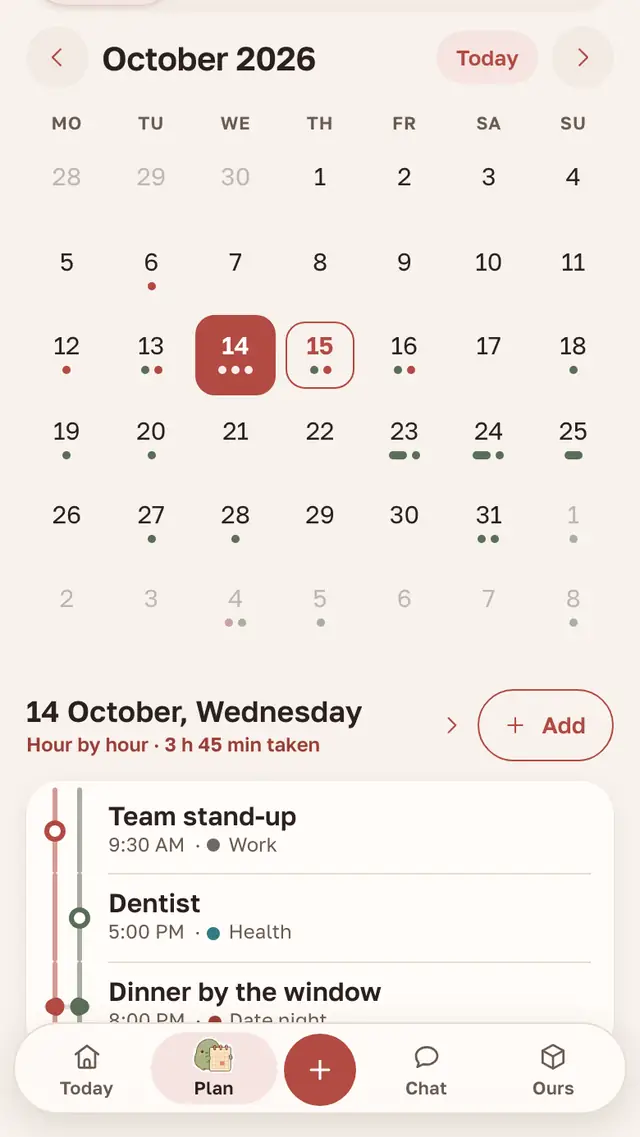
What the couple’s calendar does
- Both of you see events at once, or the next time the app opens if the connection dropped.
- A reminder in advance or right at the start of the event.
- Repeats: weekly, every few days, or on a shift pattern such as two days on, two off.
- Events that span several days — a trip, a holiday, a weekend with the family.
- Categories: Date night, Work, Home, Health, Appointment, Trip, Anniversary, Birthday — and your own, in your own colour.
- Hour by hour — how much of the day is already taken.
- Birthdays and the couple’s important dates next to the events.
Shared and personal
Each event has a “For both of us” switch. It is on by default; turn it off and the event is personal: work, the gym, your own doctor. Your partner still sees a personal event in the calendar, but it doesn’t appear on the app’s home screen or the widget for them, and no notification goes out about it.
Above the month are All, Mine and your partner’s name, so you can see at a glance whose plans these are. The dot colour shows who added an event as well.
One week in one calendar


Sage. Adds “Dentist” and turns off For both of us — the event is personal.
Clay. Puts “Dinner for two” on Saturday with a reminder a day before.
Sage. Sees the dinner in Today and coming up on the home screen.
Together. The dinner reminder arrives on both phones.
Clay and Sage, the Parella heroes, stand in for any couple
Working with Google and Apple
There are two settings here, and each works in one direction only.
“Subscribed calendars” bring another calendar in. Paste the secret iCal address of your Google Calendar, iPhone calendar, Yandex Calendar or Outlook, and its events join the couple’s calendar for both of you. It is read-only, up to three calendars per couple.
“Our calendar in Google and Apple” sends the couple’s calendar out. One secret link for the two of you puts your shared events into Google, Apple or Outlook. It doesn’t update instantly: Google can take up to a day to refresh such a calendar, Apple is quicker but not immediate. Personal events never go out through the link.
What’s next, in the app and in a widget
On the app’s home screen, “Today and coming up” shows the four nearest lines up to two months ahead: events, birthdays, tasks with a due date and the couple’s round dates such as 100 days together. The rest sits behind a “more in the calendar” line. The Calendar widget puts what’s next on your phone’s home screen.
You can also dictate an event: the “+” button passes your phrase to the assistant. “Yoga on Tuesdays until the end of the year” or “shifts two on, two off” becomes one repeating event.
How to set up a calendar for two
- Both of you install Parella and join as a couple with a code or a link.
- Plan tab → calendar → Add. The event appears for your partner right away.
- To see the couple’s events in Google or Apple: Settings → Data and account → Subscribed calendars → Our calendar in Google and Apple → Make a link.
Mikhail, I make Parella
Questions
Does the calendar work on iPhone and Android at the same time?
Yes. One of you can be on iPhone, the other on Android, and there is the browser too: the couple has one calendar.
Can we see our events in Google Calendar?
Yes, through Our calendar in Google and Apple. It is a secret, read-only link; Google refreshes such calendars slowly, up to a day.
Does my partner see my personal events?
In the calendar, yes. They don’t reach your partner’s home screen, widget or notifications, and they don’t go out through the Google and Apple link.
How much does it cost?
The calendar is free and ad-free.
Start a shared calendar
Parella is free on Android, iPhone and in the browser. The couple’s chat, wishlists and a days-together counter live there too.