

Each on your own phone
These games work long-distance. Your partner’s move or answer appears by itself, and you can close the app — the game will wait.
Secret answers 2 phones
One question for the two of you; the answers open when both have answered. Questions don’t repeat. Forty of them are on “Questions for couples”.
Guess my pick 2 phones
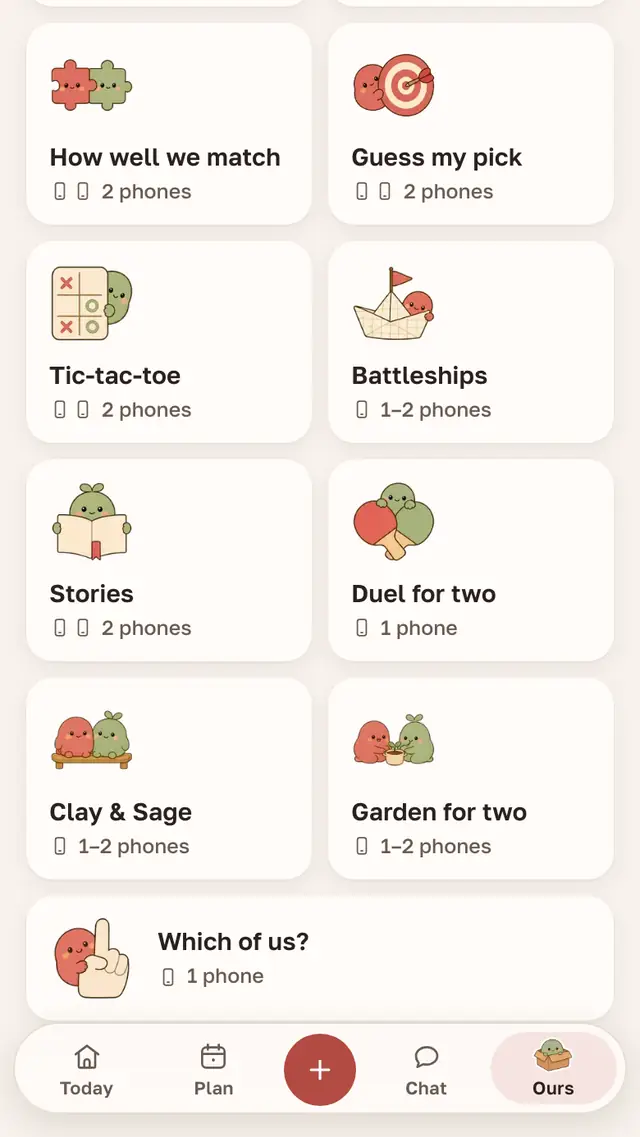
Each answers for themselves and guesses what the other will pick. Once both have answered, you see who guessed whom.
Stories 2 phones
Short stories with forks. Each picks on their own phone, the choices open when both are made, and the story follows what the two of you chose, all the way to one of the endings. At the end you see where you matched and where your choices differed. Without Plus you get the first story, the newest one and any you have already started.
Tic-tac-toe 2 phones
Clay and Sage take the place of the noughts and crosses. You take turns, each on your own phone.
Battleships 1–2 phones
A 10 by 10 grid and ten ships each. Play on two phones, or on one: between turns the screen is covered and you pass the phone across.
Dilemma 1–2 phones
Ten dilemmas with no right answers. On one phone the answers open side by side; on two you also see how many of the ten you agreed on.
Together on one phone
Which of us? 1 phone
Ten questions about habits and tastes, with buttons labelled with your names; the answers open together.
Duel for two 1 phone
Three rounds on one screen.
Questions for each other 1 phone
Twenty questions per round, then you can start over.
Date ideas
One idea a week, the same for both of you. If it’s not for you, ask for another; if you like it, put it in the calendar.
A Friday evening


Together. Battleships on one phone: after a miss, the phone goes across the table.
Clay. Starts a game of tic-tac-toe and goes to make tea.
Sage. Makes a move on their own phone, and the move shows up for Clay by itself.
Together. Finish a Story and look at where their choices differed.
Clay and Sage, the Parella heroes, stand in for any couple
Puzzles with Clay and Sage
“Clay & Sage: Together” has levels you can’t finish alone: each hero has their own element. “Garden for two” is about defending a sprout from pests: you place the heroes by the path and chase the visitors off together. Both play in the browser on one phone, and from version 1.47 the app has a mode for two phones.
The “How well do we match” test
Eighteen questions about tastes and habits: you answer, your partner answers through a link, and both of you see the match percentage and where you differ. The test runs right on the site, no sign-up: take “How well do we match”.
Where to find the games
- Both of you install Parella and join as a couple with a code or a link.
- Open the Ours tab: the games are there, you can search them by name, and the full list is under All games.
- For long-distance games, turn on Games in Settings → Notifications to hear when your partner has answered.
Mikhail, I make Parella
Questions
Are the games free?
Yes, except some of the Stories: without Plus you get the first story, the newest one and any you have already started.
What can we play long-distance?
Secret answers, Guess my pick, Stories, Tic-tac-toe, Battleships and Dilemma, each of you on your own phone.
Do both of us need the app?
For games on two phones, yes, and ideally a recent version for both: an older version may not have some of the games.
Play tonight
Parella is free on Android, iPhone and in the browser. Besides games, it has a shared calendar, a chat and a days-together counter.